Claude Light
See what needs you, at a glance.
01 · WHAT IT IS
One light for every session
Claude Light is a native macOS menu-bar app that watches every Claude Code session on your Mac and distills them into a single traffic light. One glance tells you whether an agent is waiting on you, still working, or done — no alt-tabbing through terminals to find out.
02 · THE LIGHT
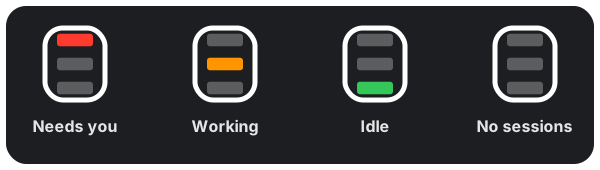
Four states, zero ambiguity

A session needs you: a question, permission prompt, or review request is waiting.
Blinks (question) · steady (permission, review)

At least one session is actively working.
Gentle pulse

Sessions are idle; nothing needs you.
Steady

No live sessions.
Steady
Click the icon for the full picture: a one-line summary such as 1 needs you · 2 working, every live session sorted by urgency, and settings — subagents, launch at login, notifications, one-click hook install or removal.
03 · HOW IT WORKS
Filesystem events, not polling
- 1. Hook shim. A small shim registers into Claude Code's hooks — installed and removed with one click from the app.
- 2. Session state. On each hook event, the shim writes that session's state to
~/.claude-light/sessions/. - 3. Live display. The app watches that folder and updates the light the moment anything changes — within a fraction of a second.
04 · WHY USE IT
Built to stay out of the way
Native, and nothing else
A lightweight Swift menu-bar app — no dock icon, no window, no Electron. The icon adapts to light and dark menu bars.
No polling, no network, no telemetry
Everything happens on your machine via filesystem events. The display reacts within a fraction of a second of a session changing state.
Red always wins
The light aggregates any number of concurrent sessions, sorted by urgency — a single waiting session is never buried behind busy ones.
Zero configuration
One-click install and removal of the Claude Code hooks, a launch-at-login toggle, and opt-in notifications when a session flips to needs-you.
05 · INSTALL
Get it running
Homebrew is the recommended path — updates arrive through brew upgrade. Requires macOS 13+.
brew tap fr1j0/claude-light
brew trust fr1j0/claude-light  # newer Homebrew requires trusting third-party taps
brew install --cask claude-light
Or download the .app from GitHub Releases ↗ and verify the published SHA-256 checksum. Releases are currently ad-hoc signed while Apple notarization is pending, so Gatekeeper may report a downloaded app as "damaged" — clear the quarantine flag (xattr -d com.apple.quarantine) and launch again. Homebrew installs are not affected.